Discord Webhook Integration
The Problem With Discord Bots
Traditional Discord bots listen to a text channel for a command that starts with a particular prefix (!, ., $, ?). This required the bot's permission to view the channel and have an open gateway connection to Discord to parse every message. This is inefficient since the bot has to maintain the connection with Discord and read every message sent on each channel.
Application commands and interactions
Discord application commands let an app register structured commands instead of parsing arbitrary message prefixes. Apps can receive those interactions over the gateway or through a public HTTP endpoint.
Using Discord Webhooks
In the Discord developer console, you can configure a webhook URL to receive slash commands instead of registering a bot with an open gateway connection. This makes the most sense for interacting with slash commands. A lot less overhead than a gateway connection.
There are two requirements for the Discord webhook:
- Validate
X-Signature-Ed25519andX-Signature-Timestampagainst the exact raw request body, and return401when verification fails. - Respond to Discord's
PINGinteraction with the requiredPONGpayload.
Occasionally, Discord will send malformed requests to your webhook to verify that it works correctly.
Slash Command Workflow
When someone uses a slash command, Discord sends an interaction through the endpoint. The endpoint must send its initial response within three seconds. If processing will take longer, defer the response immediately and edit or follow up using the interaction token, which remains valid for a limited time. The user then sees a pending response like this:
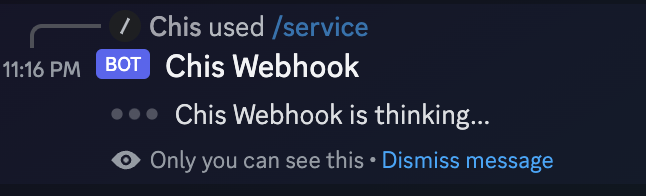
Discord will send back an interaction response to allow your webhook to send a follow-up message. Once the processing is done, the webhook can patch the deferred message with the correct response.
Discord Interactions Example
I wrote a simple webhook to start and stop game services on my personal server. Here is the repository: