Using Bolt to Build a Website
This is a snapshot of my experience in March 2025. Product pricing, model support, and the recommended Bolt.diy deployment may have changed; use the linked project documentation for current setup instructions.
Introduction
I recently heard about bolt.new from a coworker and immediately saw its potential as a tool to rebuild my website from scratch. While I've used templates in the past, they've always fallen short of providing all the features I wanted.
Initial Experience with Bolt.new
The First Prompt
I started with a very general prompt. While I could probably improve my prompt writing, I prefer not to spend too much time crafting the perfect prompt. Here's what I used:
make me a personal website
I want there to be cards in the middle of the screen populated with all of my blog posts. The posts should be in markdown, with front matter detailing the post title, date, and tags.
There should be a search bar at the top and it should be able to search through all of the blog posts dynamically highlighting the searched text in real time. There needs to be support for backlinks. On the left there needs to be a list of tags that can be selected and unselected to quickly filter by tag as well, these should be searchable. On the right there should be a section for links and other things.
Initial Results
After working through a couple of errors, I got some impressive results:
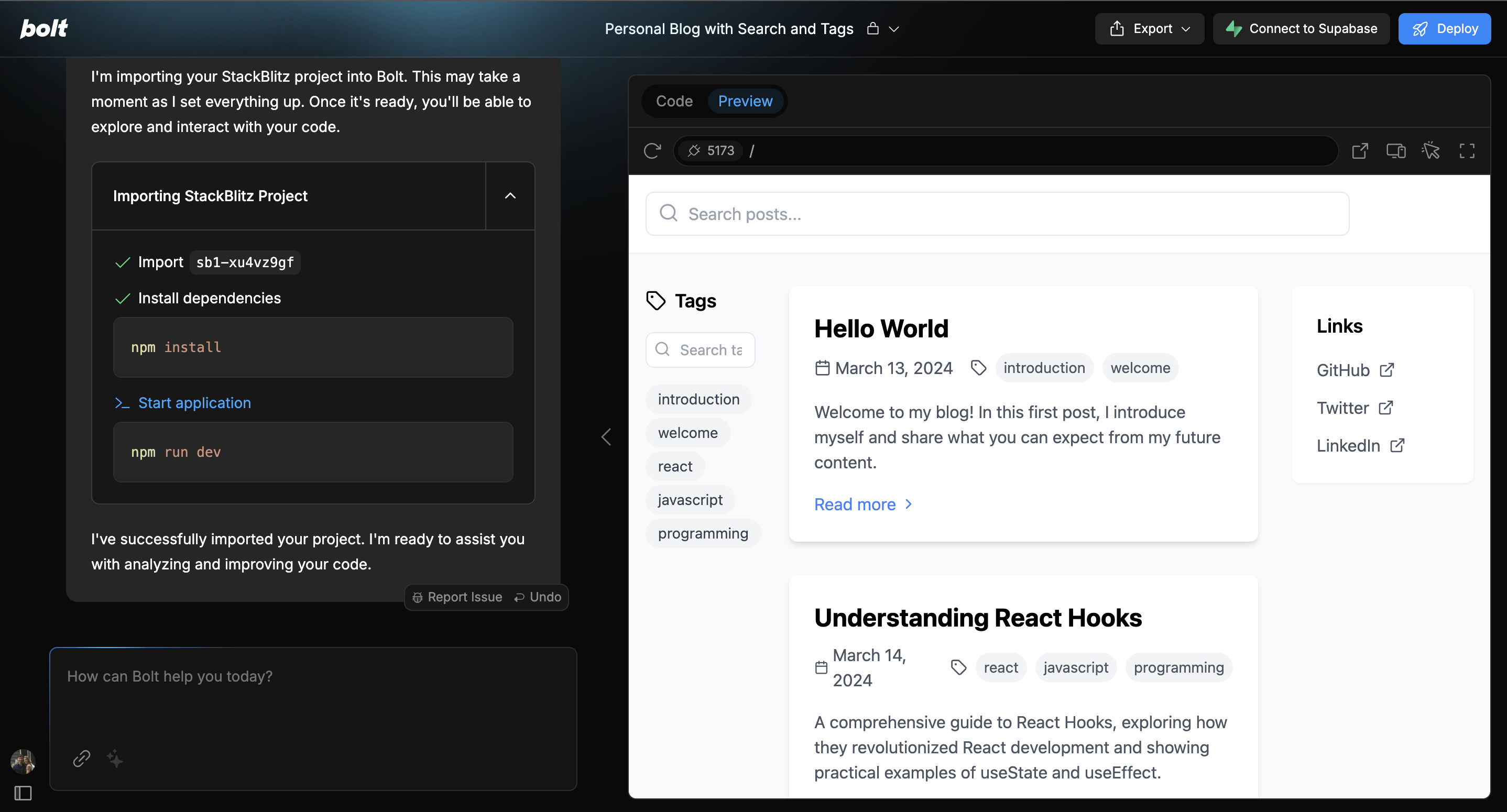
The initial output was surprisingly good - much better than my previous attempts. I believe this success was partly due to the website's built-in custom prompts and its use of Vite for the development environment. However, I quickly hit the rate limit and discovered that continuing would require a $20 monthly subscription.
Discovering Bolt.diy
Not wanting to pay for what was essentially an AI wrapper, I searched for alternatives to bolt.new. This led me to discovering Bolt.diy, a self-hosted version of Bolt that was forked from the original project. The key advantage? It supports using your own AI model instead of being limited to their service (which I suspect uses Claude).
Setting Up Bolt.diy
Here's the simple Docker compose file I used to get it running:
services:
  bolt:
    image: ghcr.io/stackblitz-labs/bolt.diy:<tested-version>
    container_name: bolt
    ports:
      - 5173:5173
    environment:
      OPEN_ROUTER_API_KEY: ${OPEN_ROUTER_API_KEY}
Store OPEN_ROUTER_API_KEY in your deployment secret mechanism or an uncommitted .env file; do not place a real key in Compose source. Pin a tested image version instead of latest for a reproducible deployment.
One important note: there's no volume mount for persistent storage because Bolt.diy operates entirely in the browser. I discovered this when my desktop Chrome browser (with hardware acceleration disabled) experienced significant lag. However, I was able to import my code directly from bolt.new by downloading and importing it, which worked perfectly.
Final Thoughts
While Bolt helped jumpstart my website development, the overall experience had several limitations:
- Inconsistent Error Detection: The system only sometimes detected code errors, requiring manual copying and pasting into the chat window.
- Navigation Issues: On my MacBook, accidental swipe gestures would navigate away from the page, losing all history.
- File Management: The sync file button exists but feels cumbersome - a more straightforward file management system would be preferable.
- AI Limitations: Even using Claude in the self-hosted version, the AI would sometimes remove code I explicitly wanted to keep, and couldn't properly fix issues by reviewing history.
Target Audience Confusion
The tool seems caught between two audiences:
- It lacks sufficient control for serious developers
- It's too complex for non-developers to debug when things go wrong
While the concept is promising, it might need to wait for more advanced AI capabilities to become truly useful. Currently, it's unclear whether it's meant for developers (who need more control) or non-developers (who need more stability and guidance). Ultimately, I completed this website using a more reliable combination of Aider and GitHub Copilot's agent mode, which proved to be a much more effective approach.